Start with the exact product
Search the selected market by product name or active ingredient, then check the formulation and strength so the schedule stays linked to the selected product and market.
 Medil AI
Medication dose schedules and patient-controlled tracking
Some medicines use a starting dose followed by timed stages. Keep that prescribed sequence together with reminders and your own dose record.
Medil AI shows the published schedule for the product you selected and asks you to confirm it matches what your prescriber told you. Nothing is scheduled until you confirm.
Source method. Medil’s dose schedules come from official product information published by national or regional medicines authorities.
Medil includes reviewed starting-dose and dose-escalation schedules for Ozempic, Wegovy, Rybelsus, Saxenda, Victoza, Mounjaro and Zepbound.
Wegovy injection and Saxenda include complete staged sequences that you confirm before scheduling. For the other listed products, Medil AI includes reviewed starting stages only, because later changes depend on instructions from your prescriber.
Select the exact product, formulation and market to see the corresponding published sequence.
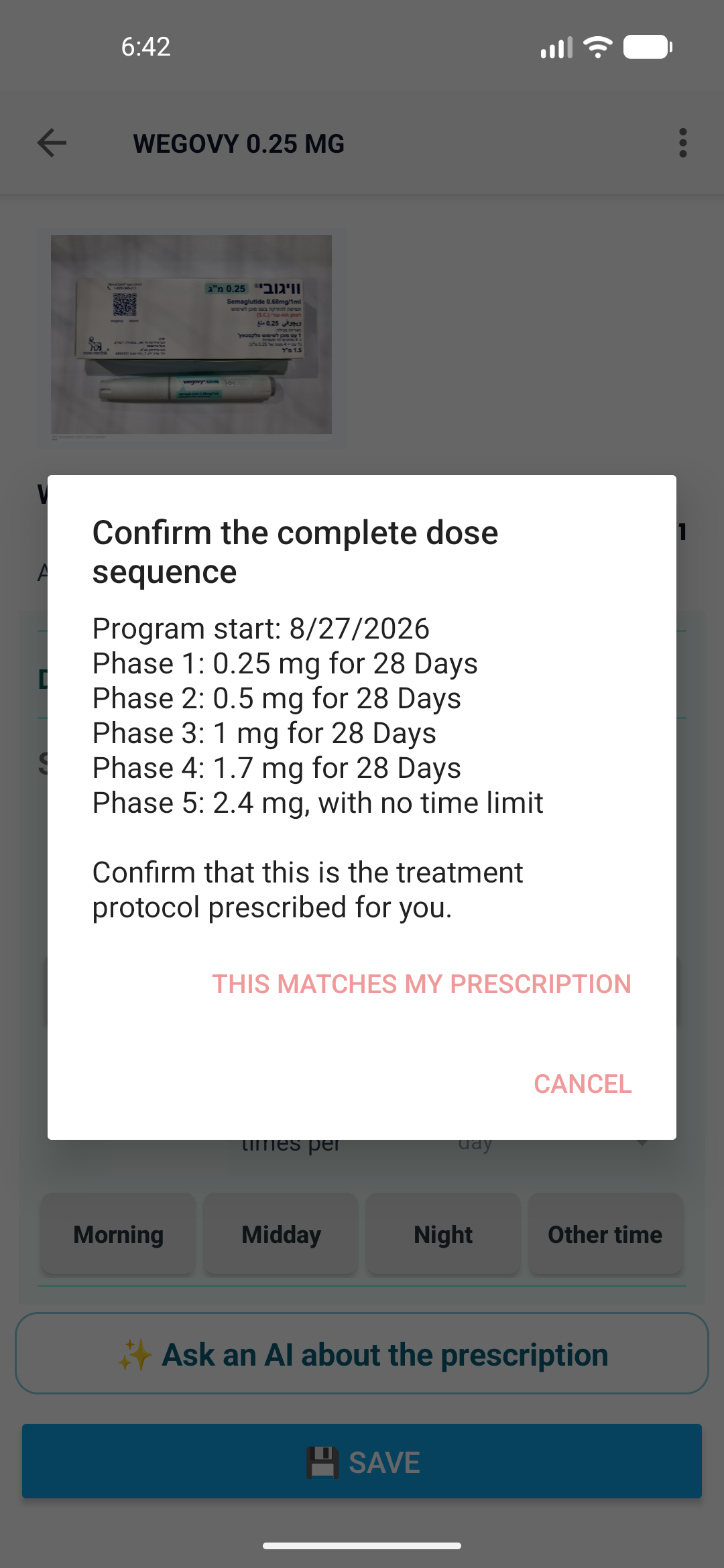
The cited United States label starts Wegovy injection at 0.25 mg once weekly and describes four-week stages through 1.7 mg. The table illustrates how Medil AI can present those stages for confirmation.
Product-specific example. The example remains linked to Wegovy injection in the United States; other formulations, products and markets use their own information.
| Treatment period | US label dosage | Stage |
|---|---|---|
| Weeks 1 through 4 | 0.25 mg once weekly | Starting stage |
| Weeks 5 through 8 | 0.5 mg once weekly | Escalation stage |
| Weeks 9 through 12 | 1 mg once weekly | Escalation stage |
| Weeks 13 through 16 | 1.7 mg once weekly | Escalation stage |
Open the current United States Wegovy label on DailyMed · Open the FDA label PDF
Source review: Page checked 10 September 2026. Example label effective 18 June 2026. The official current product information remains authoritative. Report a correction: support@medil.ai.
Use these four steps to keep the published sequence linked to your confirmed record.
Search the selected market by product name or active ingredient, then check the formulation and strength so the schedule stays linked to the selected product and market.
Compare every stage, amount, unit, date and interval with the instructions you received before confirming.
After confirmation, choose whether to enable local notifications for the saved times. Delivery depends on permission and device settings.
Use Care tracker to record what happened, including a full or partial dose, a dose not taken, or an optional note.
See the medication scheduler and Care tracker workflow · Open the illustrated patient guide · See the diabetes medicines and blood-glucose guide
Medil AI+ can request an AI-generated explanation or translation of available source-linked information. It can also prepare the medication or care context you choose for a question to an external AI service; review that context before continuing.
With Medil AI+, choose a period to review in the app, or export and print the medication list and diary for discussion with a healthcare professional.
Medil AI displays a reviewed published sequence for a supported product. After you confirm that it matches the instructions you received, the sequence creates dated phases and optional reminders.
Medil includes reviewed starting-dose and dose-escalation schedules for Ozempic, Wegovy, Rybelsus, Saxenda, Victoza, Mounjaro and Zepbound in supported markets. Wegovy injection and Saxenda include complete staged sequences that you confirm before scheduling. For the other listed products, Medil AI includes reviewed starting stages only, because later changes depend on instructions from your prescriber. Availability and sources vary by market.
Record the event in Care tracker and keep the confirmed phase dates visible. Edit the schedule if you receive updated instructions.
Schedule confirmation creates the planned dates. Care tracker then records what you report for each planned event.
Availability, product information, formulations and schedules can differ by market. Medil uses the reviewed source assigned to the selected product and supported market.
Medication information, personal schedules, local reminders and patient-confirmed dose records are free. Medical-diary history and charts, export and print tools, and AI features require Medil AI+ and are available to eligible new users during the 14-day free trial. All listed workflows work without creating a Medil account.
| Capability | Android | iPhone and iPad | Access | How it helps |
|---|---|---|---|---|
| Medication search and source-linked information | Yes | Yes | Free | Links the selected product to available official sources |
| Personal schedule and local reminders | Yes | Yes | Free | You confirm the instructions you received before scheduling |
| Patient-confirmed dose records | Yes | Yes | Free | Keeps your confirmations and notes on a timeline |
| Diary, charts, export and print | Yes | Yes | Medil AI+ / eligible trial | Patient-controlled records for review, export and discussion |
| AI explanations, translations and external-AI handoff | Yes | Yes | Medil AI+ / eligible trial | Explains or translates selected source-linked information |
The worked example links to the current DailyMed Wegovy label and the FDA label PDF. Each supported schedule is linked to reviewed official product information for that market.
The September 2026 preprint describing Medil AI 4.17 is From Prescription to Understanding: Medil AI, a Multilingual Mobile Platform for Medication Information, Pill Reminders, Adherence Support, and Between-Visit Communication · DOI 10.20944/preprints202609.0448.v1.